
Every AI Feature That Dropped in March 2026 (And What Founders Should Actually Do With Them)
A full breakdown of every AI feature shipped by OpenAI, Google, Anthropic, Microsoft, Perplexity, xAI, Meta, and Apple in March 2026, filtered for business founders who need to act on them this week. Includes 12 specific action items with time-saved estimates, cost comparisons, and step-by-step setup instructions. Written and produced using WriteFlow, the workflow-based content engine that stores your client context once and enforces brand standards across every output. The post also shows where raw AI tools improved and where WriteFlow fills the gap between smarter models and consistent, client-ready deliverables.
ARTICLEGROWTH TACTIC
Ronsley Vaz
4/3/202618 min read
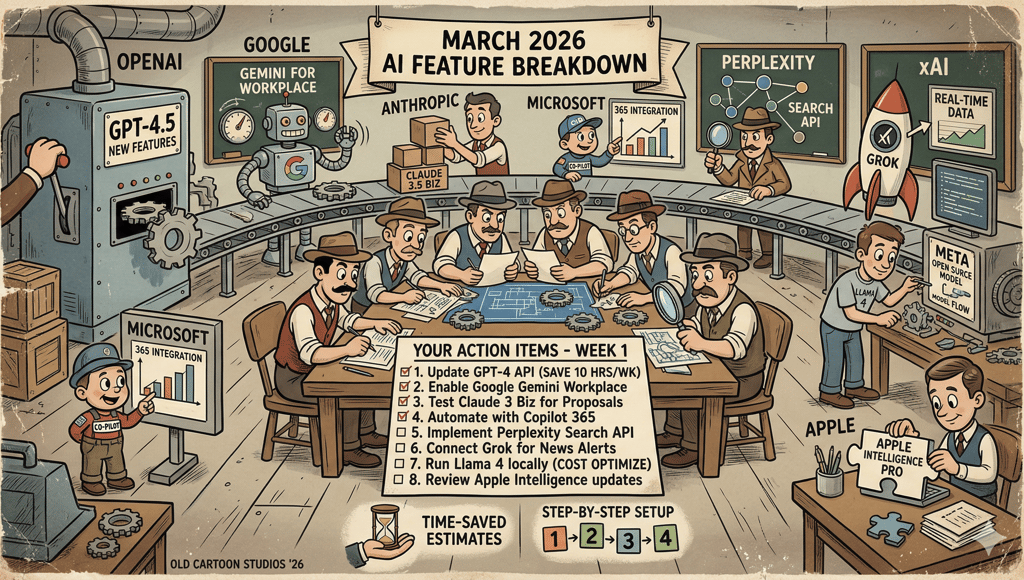
March 2026 produced more usable AI features than most of 2024 combined. Not announcements. Not research previews. Actual shipping features that change how you run a business this week.
I tracked every release from OpenAI, Google, Anthropic, Microsoft, Perplexity, xAI, Meta, and Apple across the month. Then I filtered for what matters if you run a company, manage clients, or produce content for money. The rest I cut.
This post was produced using WriteFlow. The research, the outline, the draft, and the social posts promoting it all ran through the same system. That is relevant because the biggest takeaway from March’s feature dump is this: raw AI got better, but the gap between “better AI” and “usable output” did not close. More on that at the end.
This is the full list, organised by company, followed by the section that matters most: what to do with these features on Monday morning.
OpenAI (ChatGPT / Codex)
Full ChatGPT release notes → | Model release notes →
OpenAI shipped fast in March. Two new models, a security product, deeper integrations with Google’s productivity tools, and a shopping feature that actually works.
GPT-5.4 Mini replaced GPT-5 Thinking mini as the cheaper reasoning model. Free and Go users access it through the Thinking toggle. Paid users get it as an automatic fallback when rate limits hit on GPT-5.4 Thinking. You will not see it in the model picker. It runs in the background, keeping your conversations going when the main model is busy.
GPT-5.4 with Native Computer Use landed on March 5 across ChatGPT, Codex, and the API. This is OpenAI’s first general-purpose model that can interact with screens, click buttons, and navigate software interfaces. The practical impact: Codex moved from writing code to controlling development environments. That distinction matters if you are building agents or automated workflows.
GPT-5.3 Instant got a tone fix. OpenAI reduced the clickbait phrasing that crept into responses. Phrases like “If you want…” and “You’ll never believe…” appear less frequently now. Small change. Noticeable improvement in professional outputs. Worth noting: this is the same problem WriteFlow’s anti-slop system solves at the prompt level with 60+ banned phrases and per-workflow temperature tuning. OpenAI is fixing it at the model level, which helps, but does not eliminate the issue. You still get “In today’s competitive landscape” from GPT-5.4 unless you instruct it otherwise.
GPT-5.1 models are gone. Retired March 11. Existing conversations automatically moved to GPT-5.3 Instant, GPT-5.4 Thinking, or GPT-5.4 Pro depending on what you were using. If you had API calls pointing at GPT-5.1 endpoints, they broke. WriteFlow users were unaffected because model routing runs through OpenRouter with automatic fallbacks. If your stack does not have a routing layer, this kind of deprecation can break production overnight.
Codex hit a different gear. The desktop app now runs parallel agents, meaning you can have multiple coding tasks executing simultaneously instead of queuing them. The IDE extension brought Codex into VS Code, Cursor, and forks. Codex Security launched as a research preview for Enterprise and Team customers, scanning production codebases using Opus 4.6 to reason about vulnerabilities the way a security researcher would, not pattern matching.
Interactive Learning Modules showed up for education use: 70+ math and science topics where you manipulate equations and see results change in real time. Useful if you are training a team or building educational content.
Shopping comparison got a serious upgrade. You can now compare products side-by-side with pricing, reviews, and features pulled from merchants through the Agentic Commerce Protocol (ACP). The products load in-chat. No tab switching. If you sell physical products, pay attention to how ACP structures your product data for ChatGPT to consume.
Library for Files auto-saves every file you upload or create inside ChatGPT. You can search for them later. No more losing that spreadsheet analysis you did three weeks ago.
Google Drive unification consolidated Docs, Sheets, and Slides into a single connector. Previously, you needed three separate app connections. Now one does all of it.
Large pastes become attachments. Paste more than 5,000 characters, and ChatGPT converts it to an attachment automatically. Keeps the composer clean. You can pull it back in line if you want.
Compliance Logs launched for Enterprise: immutable, time-stamped audit logs for workspace activity, including Codex usage. If your compliance team needs records of who generated what and when, this is it.
Google (Gemini / Workspace)
Gemini API changelog → | Google AI updates March 2026 →
Google treated March like a product launch month. Gemini 3.1 arrived, Personal Intelligence went free, Workspace got AI everywhere, and Maps learned to hold a conversation.
Gemini 3.1 Pro Preview doubled the reasoning capability of the previous Gemini 3 model. Independent benchmarks confirm the jump is real on complex science, research, and multi-step coding problems. The latest alias switched to 3.1 Pro on March 6. Gemini 3 Pro Preview shut down on March 9. If you are still on that model, migrate now.
Gemini 3.1 Flash-Lite targets speed and cost. 2.5x faster responses, 45% faster output generation, priced at $0.25 per million input tokens. For startups and businesses running high-volume AI calls, this is the cheapest frontier-class model available from a major provider. WriteFlow’s smart model routing already includes Flash-Lite as a candidate for Standard tier workflows where speed matters more than depth.
Gemini 3.1 Flash Live is the voice model. Lowest latency Google has shipped. Powers Gemini Live conversations, Search Live, and the Live API. Multilingual Search Live expanded to 200+ countries with this model underneath.
Personal Intelligence went free for all US Gemini users. Previously restricted to paid subscribers. Now every Gemini user can connect Gmail, Photos, and YouTube, so the assistant pulls from your actual data when answering. Ask it to plan a trip, and it checks your emails for existing bookings. Ask about a purchase, and it pulls your receipt from Gmail.
AI chat history import lets you transfer conversations and memory from ChatGPT or Claude into Gemini in a few clicks. Google wants to reduce the switching cost to zero. If you have been building context in another tool and want to try Gemini without starting over, this is how.
Gemini in Docs, Sheets, Slides, and Drive rolled out for AI Pro and AI Ultra subscribers. Gemini in Sheets now handles complex data analysis. Gemini in Drive searches across files and emails to answer questions, turning your Drive into a queryable knowledge base instead of a storage folder. English globally, with Drive features limited to the US at launch.
Ask Maps is a conversational layer inside Google Maps. You can ask questions like “Where can I charge my phone without a long wait for coffee?” and get a real answer with the ability to book a reservation mid-trip. Useful for planning client visits or scouting locations.
Canvas in AI Mode launched across the US inside Google Search. This turns Search into an interactive workspace where you can plan projects, write documents, build simple applications, and create visual content without leaving the search interface.
Antigravity vibe coding landed in Google AI Studio. Describe what you want in plain language, and the Antigravity coding agent builds production-ready applications. Supports multiplayer experiences, database integration, and connections to external services.
Lyria 3 Pro lets subscribers compose music tracks up to 3 minutes long with control over verses, bridges, and song structure. Niche, but if you produce podcast intros, video content, or ads, it eliminates the stock music licensing headache.
Gemini App Actions on Pixel devices allow users to execute complex tasks across third-party apps using natural language. Order groceries, book rides, and manage smart home devices. This moves Gemini from chatbot to agent on mobile.
Circle to Search upgrade now recognises multiple items from a single image. Circle a coat and shoes in one go, get identified results for both. Magic Cue recommends restaurants inside your chat threads without requiring you to open a separate app.
Anthropic (Claude / Claude Code)
Claude platform release notes → | Claude Code releases →
Anthropic shipped 14+ features in March while managing 5 infrastructure outages from the pace. Claude Code usage grew 300% since the Claude 4 models launched, with run-rate revenue up 5.5x. The headline: Claude moved from chatbot to agent platform.
Memory for all users including free tier. Claude now retains your name, communication style, writing preferences, and project context across conversations. You control what is stored, can edit any memory entry, and wipe everything at any time. ChatGPT restricted this to paid users. Anthropic gave it to everyone.
This is useful for general conversations. For structured client work, WriteFlow’s project profiles still solve a different problem: they store audience, niche, voice style, custom instructions, and brand guardrails per client, then inject all of that into every workflow automatically. Claude memory remembers that you like bullet points. WriteFlow project profiles enforce that your client’s banned phrases, CTA format, and tone rules are followed in every output. Different tools for different jobs.
Inline charts and visualisations. Claude now renders custom charts, diagrams, and data visualisations directly in the conversation. No export to a separate tool. Ask for a comparison table with a chart and you get both in the response.
Cowork shipped recurring tasks. You can schedule tasks that run on a cadence, plus trigger on-demand tasks. The Customize section in Claude Desktop now groups skills, plugins, and connectors in one place.
Cowork computer use lets Claude control your screen. Open files, run dev tools, point, click, navigate. Available on Pro and Max plans. Dispatch, the feature that runs tasks while you are away, got a persistent agent thread accessible from mobile and desktop.
Plugin Marketplace launched with admin controls for Team and Enterprise plans. This is the beginning of an app ecosystem for Claude.
Claude for Excel and PowerPoint add-ins now share full conversation context between applications. Every action Claude takes in one app is informed by the conversation happening in the other. Bedrock, Vertex AI, and Microsoft Foundry users can connect via an LLM gateway.
300k output token cap on the Message Batches API for Opus 4.6 and Sonnet 4.6. Include the output-300k-2026-03-24 beta header. Useful for generating long-form content, large code files, or structured data in a single API call.
Claude Code Security uses Opus 4.6 to scan codebases for vulnerabilities by reasoning about data flows and component interactions. Anthropic’s own engineers used it to find 500+ high-severity exploits in open-source projects. One time, the model deduced a flaw in a PDF tool by analysing a developer comment in a change log. Enterprise and Team customers only.
Claude Code added PowerShell support on Windows, transcript search (press / to search past sessions), MCP deduplication, bare mode for scripted calls, and channel-based permission relays that let agents forward approval prompts to your phone.
Data residency controls on the API. Specify US-only inference with the inference_geo parameter. 1.1x pricing for models released after February 1, 2026.
Web search and web fetch reached general availability. No beta header required. Code execution is free when combined with web search or web fetch.
Off-peak usage limits doubled from March 13 through March 28. Free, Pro, Max, and Team plans all got 2x capacity.
Claude Mythos leaked. A configuration error exposed a draft blog post revealing Anthropic’s next model. The company confirmed it, calling Mythos “the most capable we’ve built to date.” A new tier called Capybara reportedly outperforms Opus 4.6 on programming tasks and cybersecurity vulnerability detection. No public release date yet. Cybersecurity stock prices dropped 5%+ on the news.
Microsoft (Copilot / Microsoft 365)
What’s new in Microsoft 365 Copilot, March 2026 →
Microsoft’s biggest March move was adding Claude to its productivity stack. The multi-model approach is now official.
Copilot Cowork launched on March 30. Claude handles long-running agentic workflows inside Microsoft 365. This is built on Anthropic’s Claude Cowork technology, embedding Claude’s reasoning engine into core productivity workflows. It does not yet match standalone Claude Cowork’s capabilities: no local computer use, no third-party tool integrations outside M365.
Critique in Researcher separates generation from evaluation. GPT drafts a research response. Claude independently reviews it for accuracy, completeness, and citation quality before delivery. Microsoft claims a 13.8% improvement on the DRACO benchmark over a single-model configuration. Independent verification is pending.
This is the exact pattern WriteFlow’s Quality Checker has used since launch: generate the output, then run a separate analysis pass that scores CTA clarity, jargon level, overclaims, tone mismatch, length, readability, and brand compliance. Microsoft just validated the approach with a benchmark number. The difference: WriteFlow’s checker runs automatically on every output. Microsoft requires Copilot Cowork access.
Researcher output formats let you convert reports to PowerPoint, PDF, infographic, or audio overview in one click. Produce the research once, and adapt it for different audiences without redoing the work.
Meeting Video Recap generates a narrated highlight reel from recorded meetings. Key takeaways paired with short, relevant clips. Available for meetings 10+ minutes with recording enabled. If you miss a client call, this is faster than watching the full recording.
Work IQ in Excel pulls context from emails, meetings, chats, and files automatically when Copilot edits a workbook. No manual referencing. The model uses your actual work context to make more accurate multi-step edits.
AI in SharePoint extracts and applies metadata, adapts libraries as content changes, and structures information for Copilot and agent experiences across M365. Powered by Claude. Public Preview in March, worldwide rollout in May.
Audio Recap expanded to 8 languages: English, Chinese, French, German, Italian, Japanese, Portuguese, and Spanish. Global teams can now get AI-powered meeting summaries in their language.
xAI Grok 4.1 Fast is available in Copilot Studio for US-based agent builders. Admins must explicitly opt in. No data is retained or used for xAI model training. This gives M365 customers three model families to build agents from: OpenAI, Anthropic, and xAI.
Perplexity
Perplexity ran a developer conference (Ask) on March 11, launched a health platform, and shipped a local AI agent. The company dropped advertising entirely to protect its credibility.
Deep Research upgraded to Opus 4.6. Perplexity claims results on external benchmarks, including Google DeepMind Deep Search QA and Scale AI Research Rubric. Available for Max users immediately, rolling out to Pro.
Model Council gained memory. The multi-model system runs frontier models in parallel, cross-checks answers, and now remembers your preferences across sessions. You get consensus across models, not a single model’s opinion.
Comet browser hit iOS on March 27. Full mobile agent for research, task execution, and content creation. Your phone becomes a pocket research tool without needing a laptop.
Personal Computer agent runs locally on a dedicated Mac. Full access to local files and apps, with every action requiring user confirmation and a built-in audit trail. Perplexity positions this as more secure than OpenClaw. Max subscribers get priority access.
Perplexity Computer Enterprise added SSO, compliance controls, audit trails, and admin feature-access configuration. You can restrict which models are available to team members, control API access, and log every AI-generated answer, including the sources used.
Perplexity Health launched for Pro and Max subscribers. Connects to Apple Health, Fitbit, Withings, Ultrahuman, and electronic health records from 1.7 million care providers. Personalised dashboards for tracking biomarkers. AI agents for nutrition plans and sleep assistance. A Health Advisory Board of physicians oversees clinical accuracy.
Custom MCP Connectors let Pro, Max, and Enterprise users connect Perplexity to any tool via Model Context Protocol. If you have an internal tool with an MCP server, Perplexity can now talk to it.
Developer API Platform unified search (200+ billion indexed pages), Sonar models, embeddings, and an Agent API under a single API key. Four tiers from $1/M tokens to full agent orchestration. Launched at the Ask conference.
Response Preferences let you customise how Perplexity answers: length, tone, and detail level. Set it once, applied to every answer.
Ads removed from search. Perplexity eliminated advertising from AI answers entirely, reversing an earlier experiment. The stated reason: ads undermined user trust in answer accuracy.
xAI (Grok)
Grok Business and Enterprise packages launched. SSO, team management, usage analytics, and admin controls. Enterprise Vault provides an isolated, encrypted environment where all data and prompts stay separate from Grok’s public cloud. Priced at $30/user/month for Business, no M365 license required.
Grok 4.1 Fast became available in Microsoft Copilot Studio. Text-generation model designed for large context, deep tool use, and complex agentic workflows. US only at launch.
2 million token context window remains the largest among frontier models. Combined with what xAI claims is a ~4% hallucination rate (the lowest measured among frontier models), this positions Grok for document-heavy enterprise use cases.
Apple
Apple did not ship its Siri overhaul in March as originally planned. But three announcements set up the rest of 2026.
LLM-based Siri confirmed. The new Siri will use conversational text and voice interaction, tap into messages, notes, and emails, complete tasks within apps, access news content, and search the web. Bloomberg reports the unveiling is now June 8 at WWDC, not March.
Siri Extensions announced. iOS 27 will allow third-party AI assistants (Claude, Gemini, and others) to plug into Siri through App Store apps. Previously, ChatGPT had exclusive access. This opens the iPhone as a multi-AI platform.
Google Gemini partnership confirmed. Apple’s next generation of Foundation Models will run on Gemini and Google Cloud. The deal costs Apple roughly $1 billion per year. This is the engine behind the Siri overhaul.
Meta
Avocado model is delayed. Meta’s proprietary frontier model (a departure from Llama’s open-source approach) was expected in March. Internal tests showed it falling short of Gemini 2.5, Gemini 3, and other competitors on reasoning, coding, and writing. Pushed to May or June. Reports suggest Meta’s leadership is discussing temporarily licensing Gemini from Google as a stopgap.
Llama 4 Behemoth remains in development. The teacher model has been repeatedly postponed.
Meta AI standalone app continues running on WhatsApp, Messenger, Instagram Direct, and meta.ai powered by Llama 4 Scout and Maverick.
What Founders Should Do With This (Specific Actions, This Week)
The feature list above is large. Most of it does not matter to you today. What follows are the features that save time, save money, or open revenue, mapped to the actual workflows of someone running a business. No speculation. Only features that shipped and are available now.
1. Stop paying for meeting note tools
The feature: Microsoft Copilot Video Recap + Audio Recap in 8 languages.
What to do: If your company uses Microsoft Teams, turn on meeting recording and Copilot. Every recorded meeting now generates a narrated video highlight reel and a written summary with action items. Audio recap works in English, Chinese, French, German, Italian, Japanese, Portuguese, and Spanish.
What this replaces: Otter.ai, Fireflies (for Teams users), manual note-taking, and post-meeting summary emails. You still need dedicated tools for non-Teams meetings, but for internal calls and client meetings on Teams, the gap is closed.
Time saved: 15-30 minutes per meeting in note distribution and follow-up drafting.
2. Connect your Google Drive to ChatGPT (and stop re-uploading files)
The feature: ChatGPT Google Drive unification.
What to do: Go to Settings → Connectors in ChatGPT. Connect to Google Drive once. ChatGPT now accesses Docs, Sheets, and Slides directly. Ask it to summarise a document, analyse a spreadsheet, or draft presentation notes from an existing deck.
What this replaces: Manually downloading files, uploading them to ChatGPT, and re-uploading updated versions. Particularly useful for agency owners who manage client documents in Drive.
Time saved: 5-10 minutes per document interaction. Compounds fast if you work with multiple client folders daily.
3. Use Gemini Personal Intelligence for free (connect your Gmail, Photos, YouTube)
The feature: Google Personal Intelligence, free for all US Gemini users.
What to do: Open gemini.google.com. Go to settings. Connect Gmail, Photos, and YouTube. Now Gemini answers using your actual data. Ask “What flights do I have booked this month?” and it checks your email confirmations. Ask “Summarise the last 5 emails from [client name]”, and it pulls them.
Why this matters for founders: This was a paid feature. It is now free. If your business communication runs through Gmail, you just got a free assistant that reads your inbox.
Time saved: Varies, but eliminating manual search across emails for specific information saves 10-20 minutes per day for heavy email users.
4. Run Perplexity Deep Research before every major decision
The feature: Perplexity Deep Research on Opus 4.6.
What to do: Open Perplexity (Pro or Max). Use Deep Research for market research, competitor analysis, vendor evaluation, and due diligence. The prompt structure that works:
“Compare the top 3 [vendors/competitors/solutions] for [specific need]. Include pricing, feature gaps, customer complaints from the past 6 months, and a recommendation based on [your criteria].”
Deep Research runs for 2-5 minutes, searches multiple sources, cross-references data, and produces a cited report. The Opus 4.6 upgrade means accuracy on complex research queries is now the highest of any commercially available tool, according to Perplexity’s benchmarks.
What this replaces: 2-4 hours of manual Googling, tab management, and document compilation. One research report that used to take a morning now takes 5 minutes.
5. Use Claude's memory to build a persistent business context
The feature: Claude persistent memory for all users (including free tier).
What to do: Start a conversation with Claude and provide your business context: what you sell, who you serve, your brand voice, and your current priorities. Claude stores this and applies it to every future conversation. You never explain your business again.
For agency owners: create separate conversations for each client and load the context once. When you return to that client’s work weeks later, Claude already knows the audience, tone, offer, and CTA format.
What this replaces: Copying and pasting context at the top of every conversation. Maintaining separate prompt libraries. Repeating yourself to an AI that forgot everything from yesterday.
The WriteFlow difference: Claude's memory stores preferences. WriteFlow project profiles store preferences and enforce them. The distinction matters when consistency across 10+ client projects is non-negotiable. Claude might remember your client’s tone. WriteFlow will reject output that violates your client’s banned phrases, misses their required CTA, or drifts from their reading level. Memory is useful. Guardrails are production-grade.
Time saved: 5-10 minutes per session, every session.
6. Build a product research workflow using Perplexity’s API
The feature: Perplexity Developer API Platform with Search, Sonar, and Agent APIs.
What to do: If your business runs any automated research, content enrichment, or data collection workflows, replace your Google Custom Search API + OpenAI combination with Perplexity’s unified API. One API key covers search across 200+ billion pages, AI synthesis with citations, and agent orchestration.
The cost math: Sonar standard at $1/M tokens + $5/1K search requests. A workload of 500 queries/day costs roughly $120/month. The same workload on GPT-4 + Google Custom Search was running $280/month for at least one documented case. That is a 57% cost reduction with better-grounded answers.
Who should do this: Agencies running content research at scale, SaaS companies with customer-facing search features, and anyone building AI-powered research tools.
7. Let Claude review your GPT outputs (the Microsoft method, free version)
The feature: Microsoft’s Critique in Researcher uses Claude to review GPT-generated content. You can replicate this yourself without Copilot.
What to do: Generate your first draft in ChatGPT. Copy it. Paste it into Claude with this prompt: “Review this content for accuracy, unsupported claims, missing citations, and tone consistency with [your brand voice description]. Flag specific issues and suggest fixes.”
This two-model review catches errors that a single model misses. Microsoft measured a 13.8% accuracy improvement using this approach on research tasks.
The WriteFlow shortcut: WriteFlow’s Quality Checker runs a 7-dimension analysis (CTA clarity, jargon, overclaims, tone mismatch, length, readability, brand compliance) on every output with a single click. Same principle as Microsoft’s Critique, built into the workflow. No copying between tools. No manual prompts. If you are already inside WriteFlow, the review step is automatic.
Time saved: The manual approach adds 2-3 minutes per piece. WriteFlow’s Quality Checker takes about 10 seconds.
8. Set up Copilot Cowork if your team runs on Microsoft 365
The feature: Copilot Cowork (Claude-powered agentic workflows in M365).
What to do: Check if your organisation has access to the Frontier opt-in program. If yes, enable Cowork. Assign it multi-step tasks like research reports, competitive analysis, or document preparation. Claude handles the long-running work while you do something else.
Current limits: No local computer use. No third-party tool integrations outside M365. Works best for research, document preparation, and data analysis tasks within the Microsoft ecosystem.
Who should wait: If you need integrations with non-Microsoft tools, standalone Claude Cowork on claude.ai is more capable today.
9. Import your ChatGPT history into Gemini (test without losing context)
The feature: Google AI chat history import.
What to do: If you have been considering switching from ChatGPT to Gemini, or want to test Gemini alongside ChatGPT, use the import feature. Open Gemini, go to settings, and import your chat history and memory from ChatGPT or Claude. Gemini reads your past conversations and builds context from them.
Why this matters: Switching AI tools used to mean starting from zero. That friction kept people locked into their first choice even when a better option emerged. Google removed that barrier. Test Gemini with your actual work context, not from a blank slate.
10. Use Claude's inline charts for client reporting
The feature: Claude inline charts and visualisations.
What to do: When generating reports, analyses, or summaries in Claude, ask for charts directly in the response. “Analyse this data and include a comparison chart showing [metric] across [categories].” The chart renders inline. No export to Excel, no separate tool.
For agency owners producing client reports: this cuts one step from the production chain. Generate the analysis and the visual in the same conversation, then export.
11. Audit your AI spend with Claude Code Analytics
The feature: Claude Code Analytics API (Enterprise).
What to do: If your dev team uses Claude Code, connect the Analytics API to your internal dashboard. Track daily aggregated usage metrics, productivity data, tool usage statistics, and cost data. This tells you exactly what Claude Code is costing per developer per day and what it is producing.
Why this matters: AI coding tool spending is invisible at most companies. Nobody tracks whether the $15/seat/month (or more) is producing returns. This API makes the ROI calculation possible.
12. Prepare for Siri Extensions if you sell through mobile
The feature: Apple Siri Extensions (announced for iOS 27, September 2026).
What to do now: If your product has an iOS app, start thinking about App Intents. Apple will allow AI chatbot apps installed via the App Store to integrate with Siri. This means Claude, Gemini, and other assistants will be able to trigger actions inside your app through voice commands.
The preparation: Build App Intents for your core user actions now. When Siri Extensions launch, your app will be among the first that work with the new system. This is a distribution opportunity. Every iPhone user who enables your app’s Siri integration becomes a more active user.
The Gap These Features Don’t Fill
Every company on this list improved their models in March. Better reasoning. Faster responses. Lower prices. More integrations. The raw capability of AI tools is now extraordinary.
The gap is between capability and consistency.
Claude’s memory remembers your preferences. It does not enforce your brand standards. Gemini Personal Intelligence reads your Gmail. It does not know your client’s CTA format. ChatGPT’s Google Drive connector accesses your files. It does not apply your brand guardrails to the content it generates from them.
These are general-purpose tools. They got more powerful in March. They did not become production systems.
A production system stores your client context once and applies it to every output. It enforces banned phrases, required elements, tone rules, and CTA standards. It scores every output against a quality checklist before you see it. It routes each workflow to the right model automatically, so you never think about which AI to use for which task.
That is what WriteFlow does. Set your context once. Get consistent, client-ready outputs every time. 140+ workflows, each with the structure baked in, so you are not starting from a blank prompt and hoping the model follows your rules.
The features that dropped in March make the raw AI better. WriteFlow makes it repeatable.
If you want to try it: writeflowapp.com
The 5 Features That Matter Most for the Next 90 Days
If you read nothing else, act on these:
Claude memory (free) — Load your business context once. Never repeat yourself to AI again.
Gemini Personal Intelligence (free) — Connect Gmail. Your AI assistant now reads your inbox.
Perplexity Deep Research (Pro, $20/mo) — Replace your 3-hour research sessions with 5-minute reports.
ChatGPT Google Drive connector (Plus, $20/mo) — Stop uploading files. Point ChatGPT at your Drive.
Copilot Cowork (M365 Frontier) — If you live in Microsoft, Claude now works inside your stack.
Each of these is available today. Each saves measurable time this week. None requires a developer to set up.
And if you produce client-facing content, add WriteFlow to that stack. The tools above make AI smarter. WriteFlow makes it consistent.
See you at work.
© Amplify AI® — amplifyais.com
- Privacy → https://friday.amplifyais.com/privacy
- Terms → https://friday.amplifyais.com/terms